MetaMask Transaction Stuck Pending: How to Fix It
Why Transactions Get Stuck
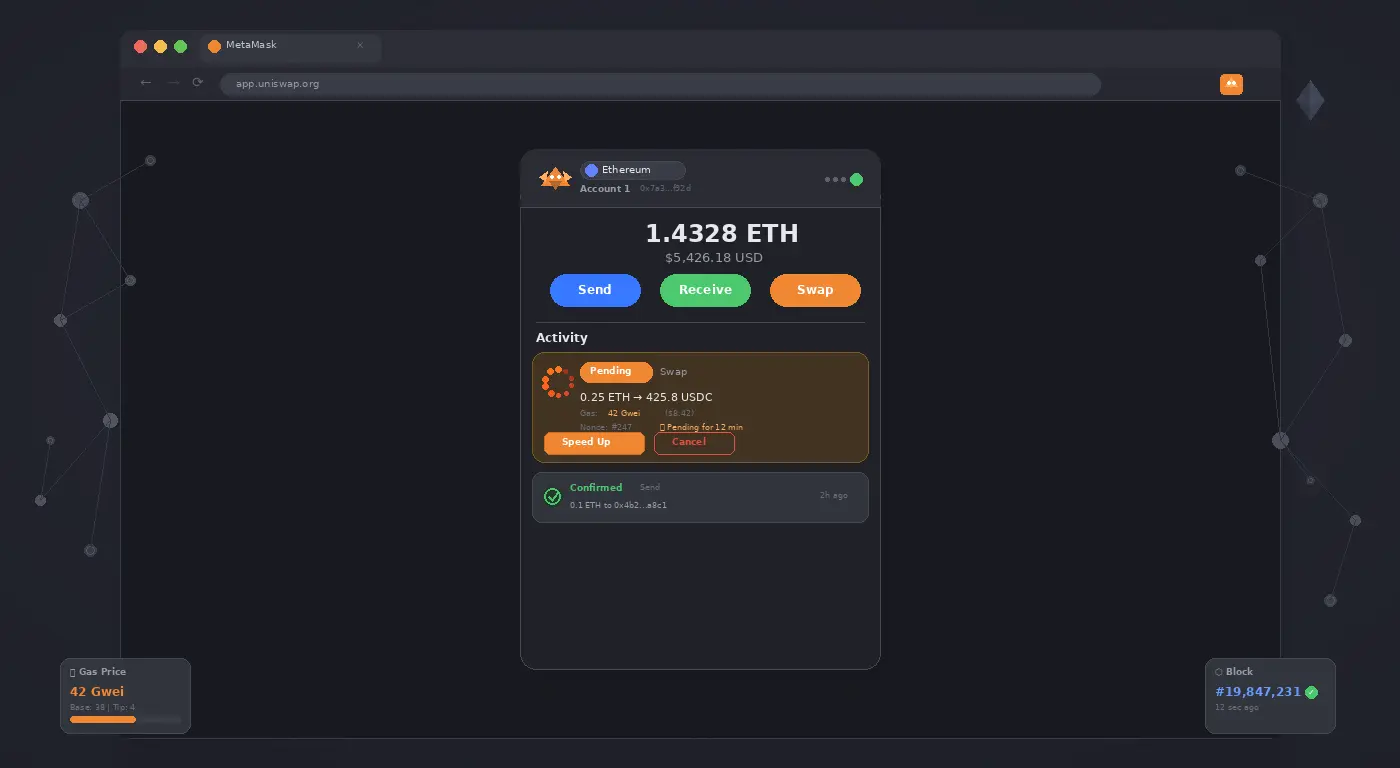
A pending MetaMask transaction means your transaction was submitted to the network but has not been included in a block yet. This almost always happens because the gas fee you set was too low relative to current network demand. Miners/validators prioritize transactions by gas fee — yours is sitting in the mempool waiting to be picked up.
Option A: Speed Up the Transaction
- In MetaMask, find the pending transaction in your Activity tab.
- Click the transaction → click Speed Up.
- MetaMask will show a higher gas fee suggestion. Accept it.
- This submits a new transaction with the same nonce but a higher gas fee, which replaces the stuck one. The higher fee version will be mined first.
Option B: Cancel the Transaction
- In the Activity tab, click the pending transaction → click Cancel.
- MetaMask sends a zero-ETH self-transfer with the same nonce and a higher gas fee.
- This “cancellation” transaction is mined first, invalidating the original. Note: cancellation is not guaranteed if the original is already being mined.
Option C: Manual Nonce Override
- Go to MetaMask Settings → Advanced → enable Customize transaction nonce.
- Start a new simple ETH transfer to yourself (0.0001 ETH is enough).
- On the confirmation screen, manually enter the nonce of the stuck transaction.
- Set the gas fee well above current network price (check ethgasstation.info).
- Confirm. This transaction mines first, making the original stuck transaction invalid.
How to Avoid This in the Future
- Always check current gas prices at etherscan.io/gastracker before transacting.
- During high-traffic events (NFT drops, DeFi launches), use at least the “Fast” gas price.
- MetaMask’s gas estimator can be inaccurate — verify against a live tracker.
Pro Tip: A transaction can only be stuck if you submitted it. If you see a “Pending” transaction you did not initiate, your wallet may be compromised. Do not send more funds — immediately transfer remaining assets to a fresh wallet and revoke token approvals at revoke.cash.
Related Guides
For more crypto troubleshooting, see our crypto transaction failed guide and our Trust Wallet balance not showing fix.











1 comment