Trust Wallet Balance Not Showing: 5 Fixes
Your Funds Are Probably Safe
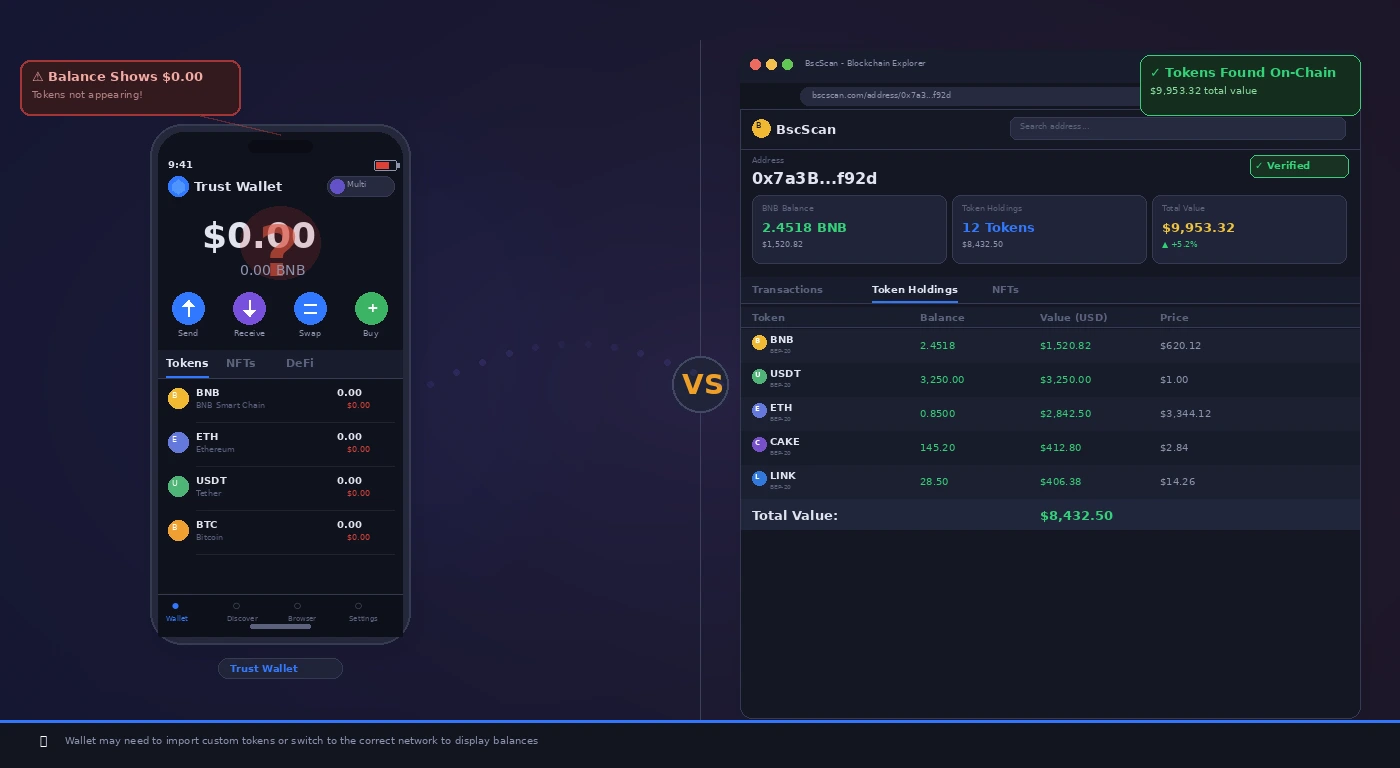
When Trust Wallet shows a zero balance or doesn’t display certain tokens, it is almost never because the funds are gone. Trust Wallet is a non-custodial wallet — it reads data from the blockchain. If the app can’t read the blockchain correctly, it shows $0. Your actual funds are still on-chain, controlled by your private key (seed phrase).
Fix 1: Check the Correct Network
- Many users send tokens on one network (e.g., BNB Smart Chain) but look for them on another (e.g., Ethereum). The token exists but on a different network.
- Tap the network selector at the top of the wallet screen and switch to the network you sent tokens on.
- Common mistake: sending BEP-20 tokens and looking for them on Ethereum, or sending USDT on Tron and looking on BSC.
Fix 2: Add the Token Manually
- Trust Wallet doesn’t show every token by default. If you received a less common token, you need to add it.
- Tap the toggle icon (top right) → search for the token by name or paste the contract address.
- You can find the correct contract address on CoinGecko or CoinMarketCap under the token’s “Contract” section.
Fix 3: Force a Wallet Refresh
- Pull down on the main wallet screen to force a manual refresh.
- If that doesn’t update the balance, close and reopen the app.
- If still wrong, go to Settings → Preferences → Reset Network Settings (this does not affect your funds or keys).
Fix 4: Verify on a Block Explorer
- Copy your wallet address.
- Visit the appropriate block explorer (Etherscan for ETH, BscScan for BSC, Solscan for SOL).
- Paste your address. If your balance appears on the explorer, your funds are safe — the issue is entirely with Trust Wallet’s display. Continue with Fix 5.
Fix 5: Reimport Your Wallet
- Make absolutely sure you have your 12-word seed phrase written down and stored safely before doing this.
- Settings → Wallets → tap the edit icon → Delete Wallet.
- Tap Import Wallet and re-enter your seed phrase.
- Trust Wallet will rescan the blockchain and display your accurate balance.
Pro Tip: If you recently sent tokens and they aren’t showing up on the block explorer either, the transaction may still be pending. Check the transaction hash on the explorer — a “Pending” status means it is still being processed. Do not resend.
Related Guides
For MetaMask transaction issues, see our MetaMask stuck pending transaction guide. For general crypto transfer failures, see our crypto transaction failed fix.