Wallet Recovery: What Works and What to Avoid
Losing access to a crypto wallet usually happens at the worst possible moment – right before a transfer, during a market move, or when you finally need to cash out. That is why wallet recovery needs to be handled carefully. A rushed step can lock you out longer, and in some cases, send you straight into a scam.
The good news is that many wallet access problems are recoverable if you still have the right backup details. The bad news is that not every problem has a fix, especially if your recovery phrase is gone or someone else already took control of your funds. The fastest path is knowing what kind of wallet you are dealing with and using the correct recovery method the first time.
Start wallet recovery by identifying the wallet type
Before you try anything else, figure out whether you are using a software wallet, a hardware wallet, or an exchange account that only feels like a wallet. This matters because the recovery path is different.
If you use an app like MetaMask, Trust Wallet, Coinbase Wallet, Phantom, or Exodus, you are usually working with a self-custody software wallet. In most cases, wallet recovery depends on your seed phrase, sometimes called a recovery phrase or secret phrase. If you still have that phrase, you can often restore the wallet on the same app or a compatible one.
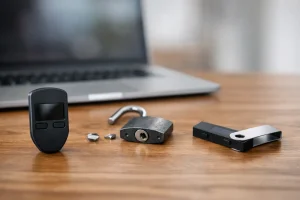
If you use a hardware wallet like Ledger or Trezor, recovery usually means restoring the device with the seed phrase after loss, damage, reset, or replacement. Your funds are not sitting inside the device itself. They live on the blockchain, and the phrase recreates access.
If your funds are on a crypto exchange, the issue is usually account recovery, not wallet recovery. That means dealing with password resets, two-factor authentication, locked accounts, identity checks, or support tickets. In that case, your seed phrase may not exist because the platform controls the wallet for you.
What you need before trying to recover a wallet
The most important item is your seed phrase. It is typically a list of 12 or 24 words written in a specific order. If one word is wrong, misspelled, or out of sequence, recovery can fail.
You may also need your wallet password. This depends on the app. A password often unlocks a local installation on your device, while the seed phrase restores the wallet itself. If you forgot the password but still have the phrase, you can usually reinstall the app and restore the wallet from scratch.
Some users also need a private key, a JSON file, or the original blockchain network details. This is more common with advanced wallets or imported accounts. For example, restoring an Ethereum wallet does not automatically show Bitcoin funds, and the reverse is also true. Sometimes the wallet is recovered correctly, but the wrong network or account path makes it look empty.
How to recover a wallet safely
The safest wallet recovery process is boring on purpose. Do not search random forums, do not trust social media replies, and do not enter your recovery phrase into any website that claims to help.
Start by reinstalling the official wallet app from the verified app store or the official provider source. Open it and choose the restore or import wallet option. Enter the recovery phrase exactly as written. Watch for spacing, spelling, and word order. Then set a new device password if the app asks for one.
After the wallet loads, give it a minute to sync. If the balance still looks wrong, check whether the correct network is enabled. Many users think recovery failed when the real issue is that the wallet is displaying the wrong chain, token list, or account.
For hardware wallets, use the device setup flow and select the recovery option. Enter the seed phrase directly on the hardware device if supported. Be careful here. If any site, app, or person asks you to type your hardware wallet phrase into a browser form or chat box, stop immediately.
Common wallet recovery problems
Some recovery attempts fail even when users believe they have the right phrase. In most cases, the issue is one of a few common mistakes.
The first is a bad phrase copy. Handwritten words can be hard to read, and similar words are often confused. Seed phrases use a standardized word list, so a phrase with an invalid word usually points to a transcription problem.
The second is restoring the wrong wallet standard or account path. This is more technical, but it matters. Some wallets derive addresses differently. If your phrase restores a wallet but not the account you expect, the funds may still be there under a different account path or imported account structure.
The third is missing tokens, not missing funds. A recovered wallet may not automatically display every token. You might need to add the token manually or switch to the right blockchain. This is common with EVM-compatible chains and lesser-known assets.
The fourth is confusion between an exchange login and a self-custody wallet. If your funds were held on an exchange, entering phrases into wallet apps will not restore anything because the exchange account is separate.
When wallet recovery is not possible
This is the part most users do not want to hear. If you lost your seed phrase, do not have access to the original unlocked device, and cannot remember the password, recovery may be impossible.
That is the trade-off with self-custody. You control the assets, but there is no reset button controlled by a company. If the backup is gone, there is often no support team that can restore access for you.
There is also a difference between losing access and losing funds. If a scammer already has your phrase and moved the assets, wallet recovery will not reverse those transactions. Blockchain transfers are generally final. Your best move then is to protect any remaining connected accounts, move other assets, and stop using the compromised wallet.
How to avoid wallet recovery scams
Scammers target people who are stressed, which makes wallet recovery a favorite bait topic. They know users searching for help are more likely to act fast.
A real wallet provider will not ask for your seed phrase in email, direct messages, support chats, or recovery websites. If anyone asks for it, assume it is a theft attempt. The only place your phrase should go is into the wallet app or hardware device during a recovery process you initiated yourself.
Watch for fake support accounts on X, Telegram, Discord, Reddit, and YouTube comments. They often promise fast recovery, “validation,” or “wallet synchronization.” Those phrases are usually a setup to get your seed phrase.
Another warning sign is urgency. If a site says your wallet must be verified immediately or your funds will be frozen, treat that as suspicious. Scammers lean hard on panic because panic bypasses caution.
Quick checks if your recovered wallet looks empty
If the restore process completed but your balance is missing, do a few checks before assuming the worst. Make sure you restored the correct phrase. Then confirm that you are on the right blockchain network and viewing the right account.
Next, compare your public wallet address with any old records you have, such as screenshots, transfer confirmations, or past receiving addresses. If the restored address is different, you may be in the wrong account path or using a different wallet standard.
Also check whether the tokens need to be added manually. A wallet can hold the assets correctly while still failing to display them by default. If the public address is correct, a blockchain explorer can help confirm whether the funds are actually there, even if the wallet app is not showing them yet.
How to prevent the next wallet recovery problem
If you regain access, fix your backup setup right away. Write the seed phrase down clearly, store it offline, and keep it in a place only you can access. Do not save it in plain text on your phone, email, cloud drive, or screenshots folder.
It also helps to test your setup before an emergency. That does not mean exposing the phrase carelessly. It means verifying that you know which wallet app you use, which networks matter, and where your backup is stored.
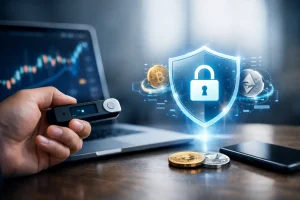
For larger balances, a hardware wallet is often the safer long-term option. It does not eliminate risk, but it reduces exposure to malware, fake browser prompts, and day-to-day device compromise. Good security is rarely about one perfect tool. It is about removing easy failure points.
If you are unsure whether your issue is a missing phrase, a bad password, a wrong network, or an exchange login problem, slow down and diagnose the exact failure first. That is usually faster than trying five random fixes. And when money is involved, the safest step is often the one that feels least dramatic.